
This is the second post in my series on the YaCy distributed, self-hosted search engine. The main topic this time is getting pages into the search index via crawling.
In contrast to search engines like Google, Bing or Kagi, the content of the search index in YaCy is driven by its users. YaCy has an integrated web crawler to crawl pages and add them to the search index. It can be invoked in one of three ways:
- Manually via a web interface in YaCy
- Automatically via scheduled (re-) crawls
- Automatically by using YaCy as a local web proxy
I will concentrate on the first way in this post. The second way, with scheduled repeats of a previous manual crawl will be described later, when I get into properly setting up and using YaCy longer term.
The third way is somewhat interesting. It avoids having to manually crawl interesting pages by configuring YaCy as a local web proxy and using it for your normal internet browsing. YaCy will then automatically launch crawls for any pages you visit. I find that a little bit too Big Brother, even though it’s all running in my own Homelab and won’t use this approach.
The manual crawl start page looks like this: YaCy’s crawl launch page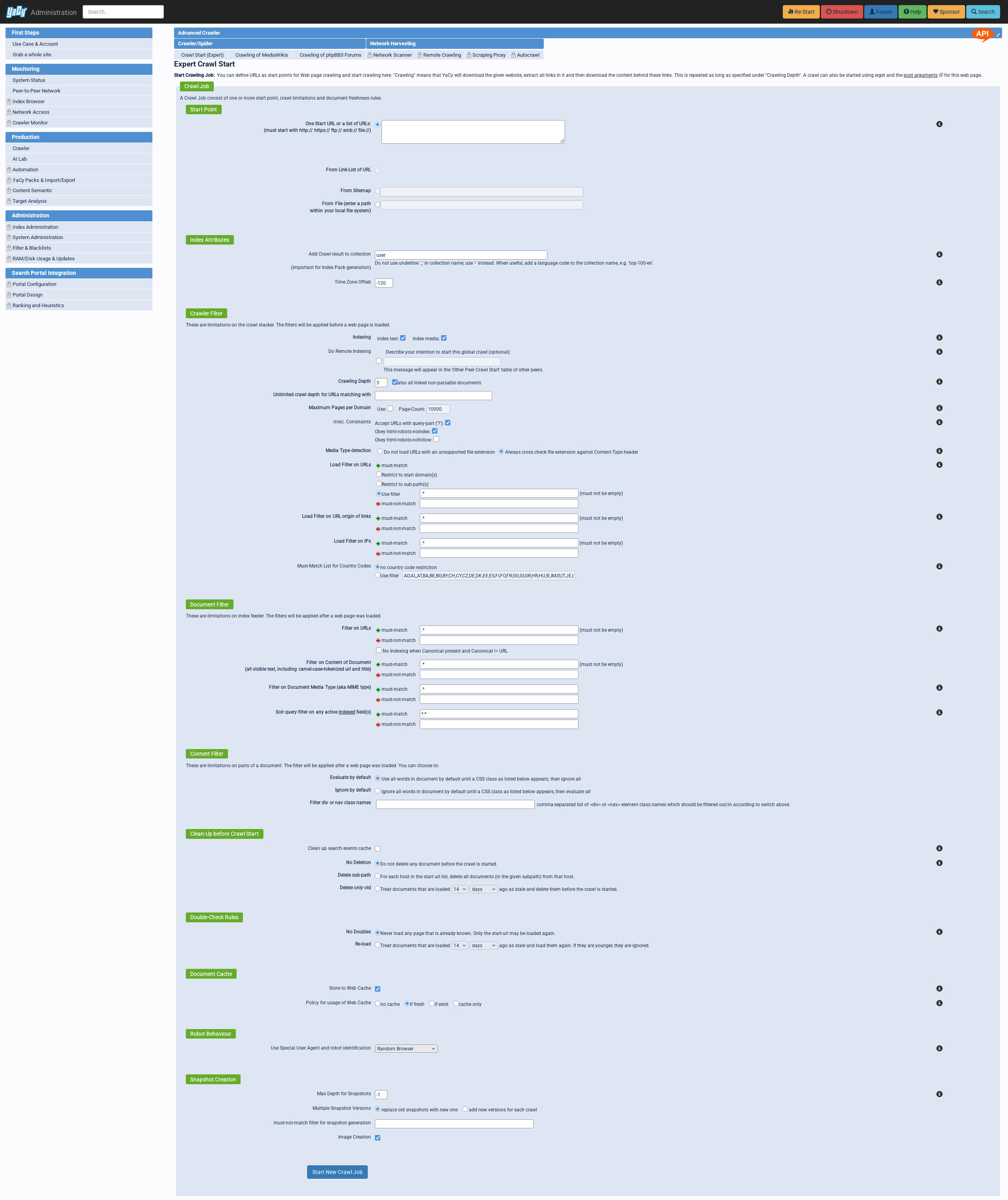
That’s certainly a lot of options. Let’s go through the most important ones. The first setting to configure is the starting point. This is a list of URLs, which can also contain paths to restrict the crawl to sub-paths. Once a URL is provided, YaCy will reach out to the page and see whether it contains a Sitemap. If so, it will allow using said Sitemap to start the crawl. Finally, the crawl can also be started from a file containing a list of URLs.
The index attributes are not too interesting, I just always used the default index.
The crawl filter section is where it really gets interesting. The configuration of the crawl depth is quite important, as it sets how deep the crawl will actually go. I will talk more about it later. I never used the page count configs, but I guess it’s a tool to get out of some sort of endless loop? The constraints will be their own topic later on. The load filter for URLs is a lot more interesting. It can either restrict to the initial domains or even sub-paths of the initial list of URLs. Instead, any regex can also be used to manually restrict the URLs. More on this also later on.
I never touched the ‘Document Filter’ at all, never saw a reason to. Same for the content filter.
The ‘Clean-Up before Crawl Start’ is more interesting. It takes the crawl start URLs and can delete all pages for those domains or sub-paths from the index. This also makes sure that they’re all re-crawled. Instead of deleting the content outright, the ‘Double-Check Rules’ section can be used to re-crawl only pages of a certain age.
I never did anything with the ‘Document Cache’ up to now. And the Robot Behaviour will be discussed in the next section.
So let’s dive a bit deeper into what happens when we click the ‘Start New Crawl Job’ button.
Crawling Basics
To start with: The crawler implementation of YaCy has a default delay between crawling the same domain of 250 ms, meaning it will produce at most 4 req/s and 240 req/min. This value can be increased by crawling multiple sites in parallel, because the restriction is only per domain, not for all crawling.
Another thing I find a little bit sad is that by default, YaCy uses random
browser user agents. But there is an option to change that in the “Robot Behaviour”
section. It does respect the robots.txt, including the Crawl-delay directive.
As the existence of the “Double-Check Rules” section indicates, YaCy does not normally visit pages which it already has in its index again. This can be worked around in two ways. The first is to delete all pages for the domain or path given in the crawl URL list. The second way is via re-crawling only pages which have last been crawled a certain time ago.
During my own crawls up to this point, I always decided to only crawl within
a certain domain or even just a certain subpath. I don’t see too much usefulness
in doing wide Internet crawls. For the few times I tried that, e.g. for this
blog, there were a lot of random pages added to the index pretty fast. To make
a per-domain crawl, I would advise not to use Restrict to start domains option
directly. That’s because that option will also exclude subdomains, which I at
least always want to include in the crawl. For example, when crawling ceph.io
I would definitely also want to crawl docs.ceph.io. Instead, I use the
Use filter option, with a filter of ^(.*\.)?ceph\.io.*$. You might be
wondering about the (.*\.)? at the beginning. This is to make sure that only
subdomains are caught, not variations on the domain. I came up with this when
I wanted to crawl the homepage of my old University town, paderborn.de. I first
launched it with a filter of .*paderborn.de. But this also caught stuff like
company-paderborn.de, which I didn’t want.
When it comes to the crawling depth, I always use .* in the “Unlimited crawl depth for URLs matching with”
field. Through the use of the filter, I already ensured that I will only get
results from the one domain I want to crawl, so just using .* here is fine
because I really want to crawl the entire page. One important thing regarding
the crawl depth I still have to look up in the code is whether YaCy somehow
stores the depth for pages which have already been crawled. As I’ve noted above,
YaCy does normally not re-crawl pages it has already seen. But this would of
course be unfortunate if the same page is later visited with a greater crawl
depth, but then gets ignored because it was already seen.
Another point I learned pretty quickly: I have to keep an eye on the crawl and
the URLs it visits. One example is GitHub, where my initial crawls happily
crawled the /commits, /blobs and /tree endpoints, resulting in a very
large amount of pages in the index which I really wasn’t interested in. Another
example is faz.net, a German newspaper. Their page has the subpath /kaufkompass.
It contains product pages for hundreds of thousands of products, and is again not
something I’m even remotely interested in crawling. Yet another example was the
homepage of the city I’m living it. It has an event calendar going back over a
decade. Also lots and lots of pages to crawl. So it’s always worth it to click
around a bit on any given page before launching the crawl, to see whether there’s
something to exclude.
Let’s next take a deeper look at two additional examples.
Crawling a GitHub project
One of the places my Google searches lead me quite often are the issues and
pull request pages of GitHub, especially when searching for error messages.
So I wanted to crawl the GitHub pages of all of the projects I’m using, for
example everything under https://github.com/yacy/yacy_search_server.
As I’ve noted above, this needs some exclusions to avoid crawling the Git repository.
In my case, what worked quite nicely was adding .*/(tree|commits|blob|changes|actions|commit)/.*
as a must-not-match URL filter. One issue I came across while trying to
crawl GitHub was that the pagination system has the pages as query parameters.
This is a problem because I normally disable URLs with query parameters, as they
generally represent dynamic content. But in the case of pagination for e.g.
issues or pull requests, I do of course want the crawler to follow them. So I
enabled the Accept URLs with query-part checkbox. This worked as expected, but
now I had a new problem: The crawler started fetching all possible filter permutations
for the issue and pull request filters, for example https://github.com/yacy/yacy_search_server/issues?q=is%3Aissue%20state%3Aopen%20author%3Apdstefan%20label%3Aindex.
These end up in the crawl queue because the links to the different filters are
delivered by GitHub when opening the issues or PR pages. I will want to work
around this, but haven’t had the time to come up with a proper regex yet. Another
thing I need to check is whether those links might have the nofollow tag, which
I’ve currently got the crawler ignoring.
Then there’s the question whether doing crawling via the GitHub API might not be “nicer” to GitHub than fetching the actual pages and listing all the time. Of course, I really couldn’t care less how much my crawling costs the LLM pushers from Microsoft GitHub. But then again, your ethics are determined by how you treat your enemies, not by how you treat your friends. This leads directly to the next question: How to handle this? I’m assuming that GitHub might not be the only page which might be easier to crawl via its API. But I also don’t think it’s really worth it to implement all sorts of special cases into YaCy’s crawler directly. This is something which obviously calls for some sort of plugin model. So I will have to figure out how to feed already crawled pages into YaCy’s index via an API. Or perhaps to introduce a YaCy API for crawling plugins.
Respecting HTTP code 429
Another target I tried to crawl was pkg.go.dev, because
I’m currently working on a Go webapp and I find
myself searching for Go packages and functions quite often. During this crawl,
I was surprisingly getting back HTTP code 429, too many requests. Of course as
I mentioned above, I want to be a well-behaved crawler. So I first verified again
whether the YaCy crawler was properly crawling at, at most, a rate of 4 req/s.
And it was. It just seems that pkg.go.dev has quite a low ceiling for engaging
its rate limiters.
To my surprise, instead of simply slowing down, YaCy just retried the error’ing pages a few more times and then just gave up on them, meaning I was missing some pages and getting others.
This lead me to spelunking through the YaCy code again, and finding that it just didn’t have any special 429 return code handling. At all. Here is what I believe to be the relevant code, see the code on GitHub:
if (statusCode > 299 && statusCode < 310) {
// ...
} else if (statusCode == HttpStatus.SC_OK || statusCode == HttpStatus.SC_NON_AUTHORITATIVE_INFORMATION) {
// ...
} else {
    // client.close(); // explicit close caused: warning: [try] explicit call to close() on an auto-closeable resource
    // if the response has not the right response type then reject file
    this.sb.crawlQueues.errorURL.push(request.url(), request.depth(), profile,
            FailCategory.TEMPORARY_NETWORK_FAILURE, "wrong http status code", statusCode);
    throw new IOException("REJECTED WRONG STATUS TYPE '" + statusline
            + "' for URL '" + requestURLString + "'$");
}
So this behavior is imminently fixable by implementing exponential back-off once 429 return codes start showing up.
Special thanks also to Remy on mastodon.social,
who pointed out the existence of the Retry-After
header. Sadly, pkg.go.dev does not send along that particular header with the
429 responses.
Thoughts on launching crawls
As I’ve noted in the introduction, there are a few ways to launch a crawl. The main problem I see is that they’re all not too great for daily, long-term use.
Sure, I can launch crawls for all of the pages I regularly visit and fill the index up front. But what about re-crawls, e.g. for new versions of documentations, or catching the content of new issues in GitHub projects? How to make sure that I don’t have to somehow remember all the configurations for all of the pages?
YaCy does have a page for repeating previous crawls, and it supposedly also can create and edit crawling profiles, but I at least haven’t been able to actually make that work. Just for the reason that I haven’t found the button for actually creating a profile yet. 🤷
Beyond that, what I would really like is a way to trigger crawl with a specific profile for the page I’ve currently open in a browser. Because having to stop reading a page and switching to YaCy to trigger a crawl would probably get old pretty fast. So this is another thing I’d like to look into: First, making sure I can properly create and manage crawling profiles, and then perhaps introducing a browser extension from which to trigger a crawl for the current page, allowing me to chose the profile.
Another interesting feature to look into regarding automating (re-)crawls would be YaCy’s RSS import feature. It can seemingly ingest an RSS feed and then regularly fetch it and crawl all new entries. This could be very nice to not have to regularly re-crawl entire blogs, and would also be pretty nice for news sites. And it might even partially work for GitHub issues and PRs, as I think there are RSS feeds available for those as well. The main problem here would be that one would want to re-crawl issues from time to time to catch newer comments.
Some general thoughts on crawling
It’s not the early 2010s anymore. The Internet has become a lot more hostile to anything self-hosted since the advent of LLMs. Personal sites and open source projects alike are getting buried under the indiscriminate incompetence of the LLM bros with more money than brains, sending their scrapers to download the exact same site 1000x times in a row, or traversing the entirety of a Git repository via HTTP - multiple times per minute. As a consequence, many people and projects have started erecting barriers, reaching from CloudFlare to projects like Iocaine or Anubis to block crawlers. But of course the same blockers also work perfectly fine against my crawling.
So even the general viability of any search engine which doesn’t have the heft of Google or Microsoft behind it seems pretty questionable now.
Besides that, I’m also wondering about how YaCy handles the distributed nature of the crawling. Let’s take codeberg.org as an example. Considering the type of people who would be interested in a distributed search engine, I’d judge the probability that multiple of us will try to crawl codeberg reasonably high. But this seems patently unnecessary, as we would just add the same pages twice to the global index. While at the same time adding undue load on the infrastructure of a non-profit doing good things in providing an alternative to GitHub. Probably not an issue with the currently very low number of running YaCy instances. But still something to think about if it ever gets more popular.
Backburner
As you can see from all of the ideas for improvements from above, there’s a lot to potentially do to make YaCy more useful. But especially the receding willingness to allow crawling by random crawlers has given me pause. Plus, I would have to invest a lot more time and make more contributions to YaCy’s code. Which is fine, but introducing YaCy to my stack was only supposed to be a short break from my Smokeweb project.
So for now, I will put the project on the backburner, and return to it once I’ve finished the majority of my work on Smokeweb.