
Welcome to the newest rabbit hole I’ve found myself in. This post starts a new series where I’m taking a look at the YaCy self-hosted, distributed peer to peer search engine. And probably web crawling and search ranking algorithms.
In this post, I will concentrate on how I deployed YaCy into my Kubernetes cluster, and a few pieces about my first steps with it. You won’t find answers to questions like “how good is it as a Google replacement?” in this post. There’s a lot more work ahead for me to actually make that judgment.
You can find this post and any future ones in the series under the YaCy tag.
A fair warning before I continue: The project accepts slopcoded contributions.
It currently doesn’t look like there’s a large team behind it, but there’s a community forum with some activity, although new signups are currently broken due to an issue with the mail server. The last release was in March, and PRs are regularly getting reviewed and merged.
What is YaCy?
While I’ve said this post is mostly about deployment, it’s probably a good idea to tell you all a bit about what YaCy is, so you know whether you actually want to read on.
YaCy is a self-hosted, peer to peer search engine. It has entirely its own index and does not rely on the likes of Bing or Google. On its main page, it presents a simple search mask:

YaCy’s main search page.
When searching, the results page should also be pretty familiar: YaCy search result example
This result was a bit unexpected right now. I hadn’t actually crawled my own blog yet, and it still found my posts. Looks like somebody has been pointing a YaCy crawl at it at some point. So this is actually what I would call a good-ish search result. It mostly found a series of blog posts about exactly what I was interested in - migrating from Nomad to Kubernetes, plus a few other results also related to migrating from something to Kubernetes.
The way YaCy works is that there is an index held locally in an embedded Apache Solr instance, which is also used for searching. This search index is filled by the instance’s own crawling of websites. I will go into more detail on crawling in a future post. By the way, if you’ve got any good blog posts or articles which explain how web crawling works these days, what to look out for and how to behave properly, I’d be very happy to hear about them, for example via the Fediverse.
The P2P aspect of YaCy is used in two different ways. The first one is during searching. In the screenshot above, on the left side, you can choose between ‘Peer-to-Peer’ or ‘Privacy’ mode. Privacy mode here means to only search the local instance’s index. The Peer-to-Peer mode searches the local index and goes out to other instances to do a remote search. The second way is via a constant gossip protocol which exchanges pieces of the local index with other instances, both sending and receiving. This is always ongoing in the background, without user intervention. This way, you will end up with a lot more entries in your local index than just what you yourself crawled, and the remote search adds to that on top.
I’m also of a mind to look into this a bit more deeply, because the official docs and what exactly is exchanged is not too detailed, and I want to look at the code a bit more.
Let’s end this section with a bit of a general vibe: The project does work. I do get search results from pages I’ve crawled myself, and I’m also getting results for pages which I definitely have not crawled myself. The network is active, showing about 600 peers seen over the past week, and I’m getting quite a few remote searches in. I’ve also had some success with a few of my searches. The example above was a pleasant surprise, getting served my own blog for a relevant search query. But there have also been other queries which were not too useful. I’ve for example just done a quick search for CloudNativePG. This did show CNPG’s GitHub page, but the home page was not in the index at all.
There are in the main two areas I will want to research more deeply. One being crawling. Most important to me is to make sure that YaCy’s crawler really respects all the rules around web crawling, like respecting robots.txt and keeping the per-site request rates low. I think it already does that, but I will need some testing. Then there’s the question of what to crawl? How deep to crawl? What’s the right way to get a breadth-first crawl going, instead of just indexing pages I already know? But without filling the index with too much garbage?
Then there’s search ranking. It doesn’t come out in the example search from above, but the ranking is really not great sometimes. But it’s also highly configurable. And there is an extended ranking called CitationRank, similar to Google’s PageRank. I really want to dig into that and how it’s implemented.
One nice thing to note: YaCy implements the necessary APIs to be used as a search provider in Firefox.
Deploying YaCy
YaCy is a Java application and comes with multiple ways of deploying it, both with and without Docker. It has a few warts, though.
Before I get to my Kubernetes deployment, a quick note: You can also run it locally on your own desktop machine. It works perfectly nice there, even without an externally open port. You won’t be fully participating in the P2P network, but you will be able to do remote searches. And when you’re triggering crawls, your resulting index will even be shared with other peers. But your instance won’t be serving other peer’s remote searches, and you won’t be able to receive index updates from other peers via the background gossip protocol.
Let’s start with the Docker images. At the moment, the newest versioned releases
for the Docker image on Dockerhub
are from 12 months ago, even though there was a YaCy release in March. The only
current images are in the latest tag, which I don’t really like. So my first
step was building the YaCy image myself. Here is the Containerfile:
## builder image
ARG alpine_ver
ARG jdk_ver
ARG wkhtmltopdf_ver
FROM eclipse-temurin:${jdk_ver}-jdk-alpine-${alpine_ver} AS builder

# Install needed packages not in base image
RUN apk add --no-cache curl git apache-ant

# set current working dir & copy sources
WORKDIR /opt
COPY . /opt/yacy_search_server/
RUN ant compile -f /opt/yacy_search_server/build.xml \
    && rm -fr /opt/yacy_search_server/.git

# Set initial admin password: "yacy" (encoded with custom yacy md5 function net.yacy.cora.order.Digest.encodeMD5Hex())
RUN sed -i "/adminAccountBase64MD5=/c\adminAccountBase64MD5=MD5:8cffbc0d66567a0987a4aba1ec46d63c" /opt/yacy_search_server/defaults/yacy.init && \
	sed -i "/adminAccountForLocalhost=/c\adminAccountForLocalhost=false" /opt/yacy_search_server/defaults/yacy.init && \
	sed -i "/server.https=false/c\server.https=true" /opt/yacy_search_server/defaults/yacy.init

## build final image
FROM surnet/alpine-wkhtmltopdf:${wkhtmltopdf_ver} AS wkhtmltopdf
FROM eclipse-temurin:${jdk_ver}-jre-alpine-${alpine_ver} AS app

RUN apk add --no-cache \
	imagemagick \
	xvfb \
	ghostscript \
	# Install dependencies for wkhtmltopdf
	libstdc++ \
	libx11 \
	libxrender \
	libxext \
	libssl3 \
	ca-certificates \
	fontconfig \
	freetype \
	ttf-dejavu \
	ttf-droid \
	ttf-freefont \
	ttf-liberation \
	# more fonts
	&& apk add --no-cache --virtual .build-deps \
	msttcorefonts-installer \
	# Install microsoft fonts
	&& update-ms-fonts \
	&& fc-cache -f \
	# Clean up when done
	&& rm -rf /tmp/* \
	&& apk del .build-deps

# Copy wkhtmltopdf files from docker-wkhtmltopdf image
COPY --from=wkhtmltopdf /bin/wkhtmltopdf /bin/wkhtmltopdf

# copy YaCy to app image
RUN addgroup yacy && adduser -S -G yacy -H -D yacy
WORKDIR /opt
COPY --chown=yacy:yacy --from=builder /opt/yacy_search_server /opt/yacy_search_server

# Expose HTTP and HTTPS default ports
EXPOSE 8090 8443

# Set data volume: yacy data and configuration will persist even after container stop or destruction
VOLUME ["/opt/yacy_search_server/DATA"]

# Next commands run as yacy as non-root user for improved security
USER yacy

# Start yacy as a foreground process (-f) to display console logs and to wait for yacy process
CMD ["/bin/sh","/opt/yacy_search_server/startYACY.sh","-f"]
It’s a light adaption of the official Alpine Dockerfile, with the only change being that I introduced configurable versions for the JDK, Alpine and other tooling. I build this via my internal pipeline. If you’re interested, have a look at this post.
With that done, I could create the Kubernetes deployment:
apiVersion: apps/v1
kind: Deployment
metadata:
  name: yacy
spec:
  replicas: 1
  selector:
    matchLabels:
      homelab/app: yacy
  strategy:
    type: "Recreate"
  template:
    metadata:
      labels:
        homelab/app: yacy
    spec:
      automountServiceAccountToken: false
      securityContext:
        fsGroup: 1000
        runAsNonRoot: true
        runAsUser: 100
        runAsGroup: 1000
      containers:
        - name: yacy
          securityContext:
            allowPrivilegeEscalation: false
            # Can't be done because htroot/ is written to and is outside DATA/ dir
            # At the same time, this dir contains files already, so can't just be remapped
            #readOnlyRootFilesystem: true
            capabilities:
              drop:
                - ALL
          image: containers.homelab.example/homelab/yacy:{{ .Values.appVersion }}
          volumeMounts:
            - name: data
              mountPath: {{ .Values.mountDir }}
          resources:
            limits:
              cpu: 2000m
              memory: 3200M
            requests:
              cpu: 2000m
              memory: 3200M
          env:
            - name: YACY_PORT
              value: "{{ .Values.ports.bind }}"
            - name: YACY_PORT_PUBLIC
              value: "{{ .Values.ports.public }}"
            - name: YACY_STATICIP
              value: "{{ .Values.domain }}"
            - name: YACY_JAVASTART_XMX
              value: "Xmx3000m"
            - name: YACY_UPNP_ENABLED
              value: "false"
            - name: YACY_SERVER_HTTPS
              value: "false"
            - name: YACY_NETWORK_UNIT_PROTOCOL_HTTPS_PREFERRED
              value: "true"
            - name: YACY_UPDATE_PROCESS
              value: "manual"
            - name: YACY_PROMOTESEARCHPAGEGREETING
              value: "Meier's Search"
            - name: YACY_PROXYCLIENT
              value: ""
            - name: YACY_ADMINACCOUNTFORLOCALHOST
              value: "false"
            - name: YACY_SCAN_ENABLED
              value: "false"
            - name: YACY_BROWSERPOPUPTRIGGER
              value: "false"
            - name: YACY_TRAY_ICON_ENABLED
              value: "false"
            - name: YACY_NETWORK_UNIT_AGENT
              value: "mei-home-search"
          livenessProbe:
            httpGet:
              port: {{ .Values.ports.bind }}
              path: "/"
            initialDelaySeconds: 30
            periodSeconds: 30
          startupProbe:
            httpGet:
              port: {{ .Values.ports.bind }}
              path: "/"
            periodSeconds: 10
            failureThreshold: 24
            initialDelaySeconds: 60
          ports:
            - name: yacy-http
              containerPort: {{ .Values.ports.bind }}
              protocol: TCP
      volumes:
        - name: data
          persistentVolumeClaim:
            claimName: yacy-volume
So there’s a few things to say about the config. First, note that the Container
cannot be configured with readOnlyRootFilesystem: false. This is because files
are written to directories which already contain other files as part of the
image, so it can’t be re-mounted.
Another thing worth mentioning is the rather long startup probe duration. This is due to the fact that sometimes, YaCy does some cleanup/compression during startup. Especially after a crash instead of a proper shutdown. This can take quite a while, especially when you’re working with a Pi 4 class CPU.
Then there’s a general problem with the setup of the environment variables.
The issue is that the env variables correspond to settings in the YaCy config
file. To set those via env variables, you have to prepend YACY_ to the front
of the config key’s name and also upper case it and replace . with _. This
works for values like some.setting.name, but fails for settings like someSettingName.
That’s due to how a check to see whether a config key corresponding to the
env variable name exists works, lower casing the whole env variable name and
then searching for it in the configs.
See this issue and my
accompanying fix here.
Also note that the YACY_PORT_PUBLIC setting is not currently supported upstream,
it’s a fix for an issue I’ve discovered earlier. I will go into more detail
in the next section.
The YACY_PORT and YACY_PORT_PUBLIC settings set the port YaCy binds to and
the port it communicates to other peers for connections, respectively. I’m
disabling UPnP as well as HTTPS, as I don’t have UPnP enabled in my firewall
and YaCy is fronted by a reverse proxy terminating TLS. The YACY_STATICIP
setting defines the address reported to other peers trying to contact this
one. Despite its name, it also happily takes a domain, not just an IP.
The YACY_PROMOTESEARCHPAGEGREETING
setting configures the subheading shown under the YaCy logo on the search page.
YACY_ADMINACCOUNTFORLOCALHOST is an important setting. By default, YaCy
launches with a configuration which allows all connections coming from local to
do anything they want without any further authentication. Not a good default in
my view, but likely intended to make it easier to handle when running an instance
locally.
YACY_SCAN_ENABLED is disabled here, as that setting would scan the local network
for other YaCy instances. Not useful, as this is the only instance I’m running.
Well, right now at least.
Both YACY_BROWSERPOPUPTRIGGER and YACY_TRAY_ICON_ENABLED are irrelevant for
deployments on Kubernetes, as they enable features only useful for local desktop
deployments.
And finally, YACY_NETWORK_UNIT_AGENT defines the name of the peer in the YaCy P2P
network. If not given, a name will be generated randomly.
One note on the volume I’m attaching here: This is a Ceph RBD from an SSD pool. I figured that Solr would likely not be happy with a network attached HDD volume. I haven’t had any performance or stability issues with this.
It’s also worth noting that YaCy can be configured via a config file as well,
but it’s not really cloud native. There is the yacy.init
file to begin with. During first startup, that’s copied to get the initial
config file. It should work perfectly well to override this with e.g. a ConfigMap
to change some settings.
Any changes after that initial setup are more complicated without using env
variables though. That’s because the real config file under DATA/SETTINGS/yacy.conf
is also written to by YaCy when changes are made via the web UI. Those would be
lost upon restart with a ConfigMap.
External accessibility and peering
Before getting into the details, it’s worth noting that YaCy has different peer levels an instance can have, ranging from “Virgin” (yes, I know 😔), where it hasn’t had contact to any outside instance, to “Principal”. Virgin instances are for example instances which are really only for local use, e.g. providing search for an intranet and its sites only. In this mode, the instance doesn’t connect to any other peers and doesn’t participate in the global search index.
The next level is “Junior”. Here, the instance can connect to external peers at least outgoing. This allows usage of P2P search and outgoing transfers of pieces of the local index, but not receipt of index pieces from other peers.
Next comes the “Senior” mode. This is what my instance is currently running in.
It means full participation in the P2P index, being able to be contacted by
external peers. If you’re curious, my instance is mei-home-search.
The final level, “Principal”, is a Senior instance which also provides an initial seed list. Some of those are hardcoded into the YaCy binary as a starting point for new instances. This is only required during initial setup. Afterwards, each instance keeps its own seed list and uses that after restarts.
To take part in the peer to peer aspect of YaCy, external peers need to have
access to my instance. I was a bit apprehensive about just hanging the entire
thing out in public. But I found that just making the /yacy/ path available
seems to be enough to make peering work.
So the next thing to look at is the address and port YaCy hands to other peers for the P2P connection. Here, the YaCy docs in the yacy.init file are a bit confusing and don’t really work, at least for me. They document three different ports:
# port number where the server should bind to
port = 8090
[...]
#sometimes you may want yacy to bind to another port, than the one reachable from outside.
#then set bindPort to the port yacy should bind on, and port to the port, visible from outside
#to run yacy on port 8090, reachable from port 80, set bindPort=8090, port=80 and use
#iptables -t nat -A PREROUTING -p tcp -s 192.168.24.0/16 --dport 80 -j DNAT --to 192.168.24.1:8090
#(of course you need to customize the ips)
bindPort =
[...]
#publicPort if you use a different port to access YaCy than the one it listens on, you can use this setting
publicPort=
The port config is the expected configuration for the port YaCy actually binds
to. Reading the bindPort config, you might expect that you could set the
bindPort instead, and then YaCy would bind to that and only set the port as
the port communicated to external peers for connections. I tried it with a setting
like this:
port = 443
bindPort = 8090
This lead to errors during startup, because now YaCy was trying to bind to 443,
which failed because it’s not running as root.
After some searching, I found that bindPort doesn’t show up anywhere in the
code. It seems to simply be unused. I’ve created a PR
to remove it.
Then there’s the publicPort setting. I couldn’t use it via env variables due
to the aforementioned issues with camelCase settings. But I tried setting it
through the UI as well as manually editing the config file. Neither worked.
External requests still shattered on my firewall, trying to access port 8090,
or any other port I set in the port setting. But what I wanted here was a way
to set the listening port of YaCy itself separate from the port that YaCy tells
other peers to connect to. I also didn’t want to set the port setting to 443,
because that would have meant extended permissions for the YaCy container.
I could have opened port 8090, but I also didn’t want to do that. I already have
ports 80 and 443 open and wanted to use them. So I looked into the code instead.
See this issue and the
accompanying pull request.
With that (as of yet unmerged) PR, there is now a new port.public setting, which
only configures which port is send to other peers for external connections.
With that set to 80, I was hoping everything to work now. But other peers were still
unable to reach mine. This time though, the issue was entirely of my own making.
In my Bastion Traefik, I had two open ports, one NAT’ed to my external port 80 and
one to external 443. But to again keep permissions for that Traefik instance
restricted, those ports on the bastion host were not 80 and 443, but higher
ports. But I used Traefik’s entrypoint redirection to point the HTTP entrypoint to the HTTPS entrypoint. This,
of course, did never actually work. As this setting would reply to any request
to the HTTP port with a permanent redirect. But not to port 443, but to the port
where the internal HTTPS endpoint was listening. Which isn’t accessible publicly.
That took me quite a while to figure out.
But once I had finally configured that correctly, my peer started peering properly.
There’s still something hinky though. YaCy regularly reports the peering status in the logs, here’s an example from my peer:
PeerPing: I am accessible for 31 peer(s), not accessible for 24 peer(s).
So peering definitely works for some peers. I know that because I’m receiving remote search queries with no issue. But some other peers still cannot connect to me. And I just can’t figure out why not. Something to look into at a later date.
Resource consumption
Before I end this post, a short look at the resource needs is in order. My usage has been rather restricted up to now, but I have done at least a few crawls already, of a few random pages. I’ve for example crawled kubernetes.io, the German newspaper faz.net and the official pages of a few cities I’ve lived in the past, just to get a feeling. In total, that lead to a disk usage of about 13 GB. The top was at 16 GB, but I’m not sure why it’s suddenly so much reduced.
When it comes to networking, the need is not too much. The few crawls I’ve done up to now haven’t even saturated my “my country is a bit shit at the internet” 250 MBit/s connection.
Then there’s CPU usage. Here is the usage of the YaCy Pod since its launch: YaCy’s CPU utilization.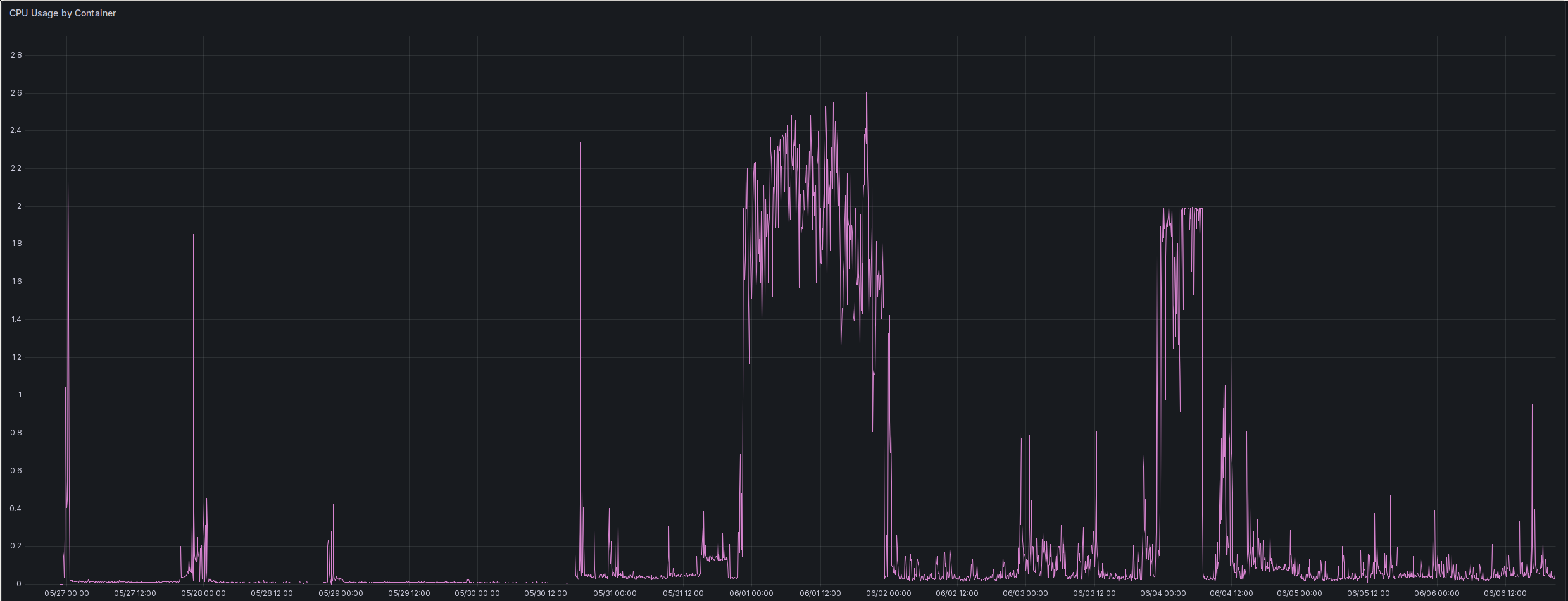
Note that that this is the Kubernetes way of measuring CPU, meaning a utilization of 1.0 means one core fully used. Also, this is running on Raspberry Pi CM4. The two phases with higher utilization than 0.2 were while I was running crawls. Everything else is normal use, and the smaller/shorter spikes are restarts. So CPU power seems to be mostly used during crawling and ingestion of the results into the local index.
Here is the memory usage: YaCy’s memory consumption.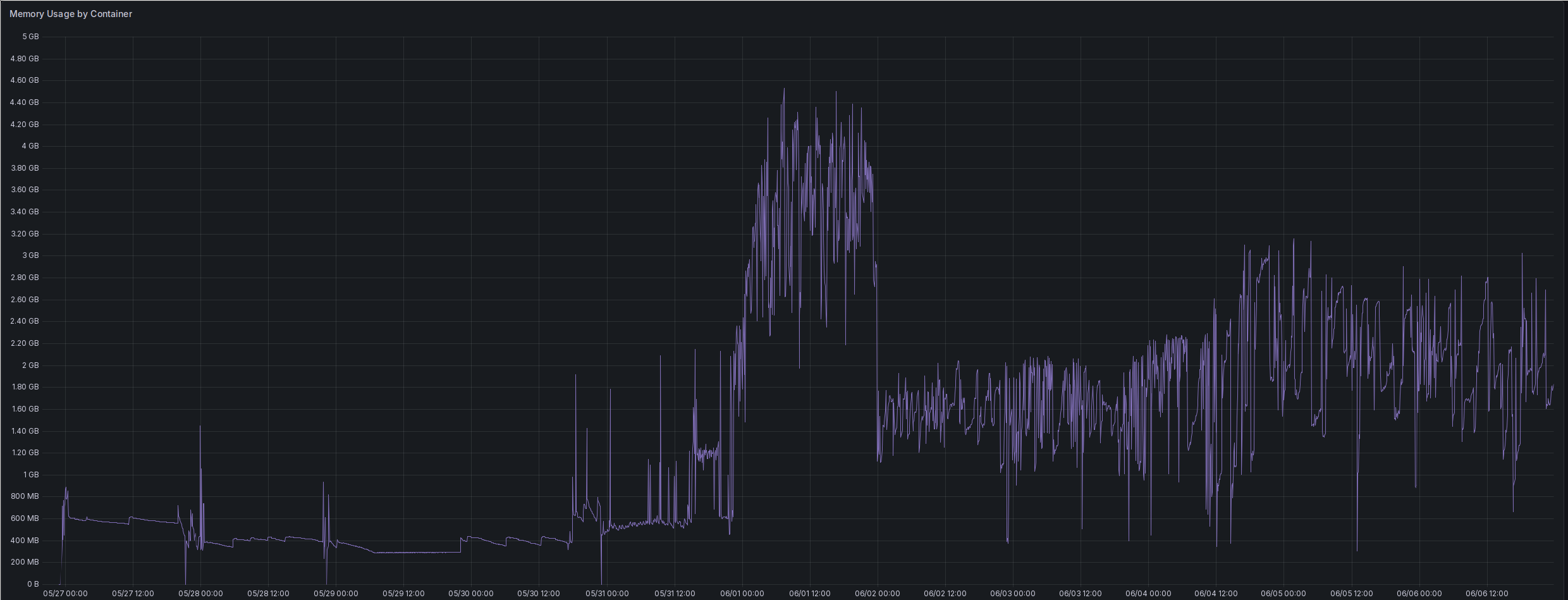
As is typical for a garbage collected language like Java, the memory consumption
fluctuates a lot. Once I had gathered a bit of an index through my first crawls,
the average consumption rose quite a bit. I only reached stability without OOM
after increasing the limit all the way up to 3 GB and setting the JVM’s Xmx
option to 3000 MB. I expect to have to increase the volume once the size of the
local index increases when I crawl more sites.
After I’ve used YaCy properly for a while, I will likely write up another post on its scaling behavior, because I’m rather curious about that. But for now it seems to run quite happily in that 3 GB limit.
What’s next
The next part will be a deep dive into crawling. I’ve already found that just
choosing a starting point and just doing a depth 3 crawl isn’t really that great.
I’ve also found that you pretty much need to first explore the page you’re crawling
a bit. Two examples: The faz.net page has a gigantic
/kaufkompass/ category full of products which is really not worth crawling.
And when crawling a GitHub project, you will likely want to exclude /tree,
/commits and /blobs.
There also seem to be features for importing e.g. ZIM files or RSS feeds.
And there’s the question of how to get better search result ranking.
And finally, there’s quite some interesting metrics available, like crawled pages, number of peers, number of remote searches and so on. I’m feeling very tempted to either implement Prometheus metrics directly in YaCy, or writing an external exporter which scrapes YaCy’s existing APIs.